整理声音管理模块,从专辑选择、腾讯云点播上传,到声音列表、删除、修改等接口的学习记录。
本篇要点
分析声音与专辑的关系
学习音频上传与保存流程
梳理声音列表和维护接口
内容回顾 专辑管理模块
– 行变列
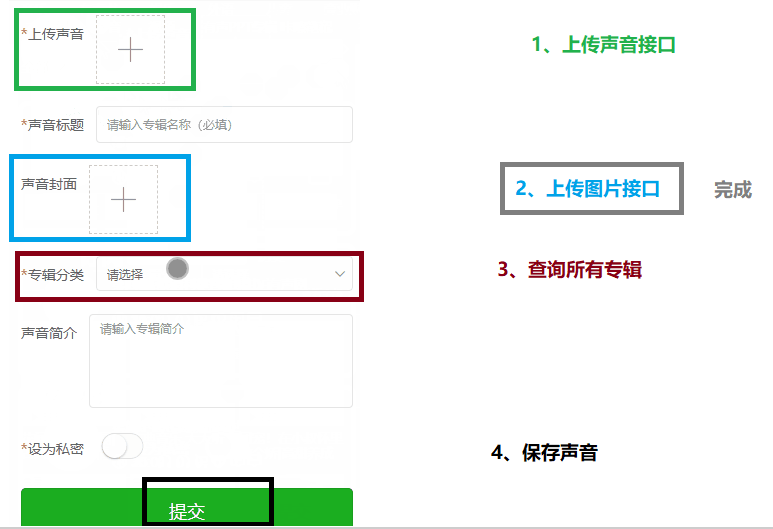
今天内容 声音管理模块 1、保存声音 1.1 分析 实现以下接口
上传声音的接口(腾讯云云点播服务) 上传图片接口(已经完成了)
查询所有专辑接口 保存声音的接口
1.2 查询所有专辑接口
AlbumInfoApiController 1 2 3 4 5 6 7 @Operation(summary = "获取当前用户全部专辑列表") @GetMapping("findUserAllAlbumList") public Result findUserAllAlbumList () { Long userId = 1L ; List<AlbumInfo> list = albumInfoService.findUserAllAlbumList(userId); return Result.ok(list); }
service 1 2 3 4 5 6 7 8 9 10 11 12 13 14 15 16 17 18 19 20 21 22 @Override public List<AlbumInfo> findUserAllAlbumList (Long userId) { Page<AlbumInfo> pageParam = new Page <>(1 , 100 ); LambdaQueryWrapper<AlbumInfo> wrapper = new LambdaQueryWrapper <>(); wrapper.select(AlbumInfo::getId,AlbumInfo::getAlbumTitle); wrapper.eq(AlbumInfo::getUserId,userId); wrapper.orderByDesc(AlbumInfo::getId); IPage<AlbumInfo> albumInfoPage = albumInfoMapper.selectPage(pageParam, wrapper); List<AlbumInfo> list = albumInfoPage.getRecords(); return list; }
1.3 上传声音接口
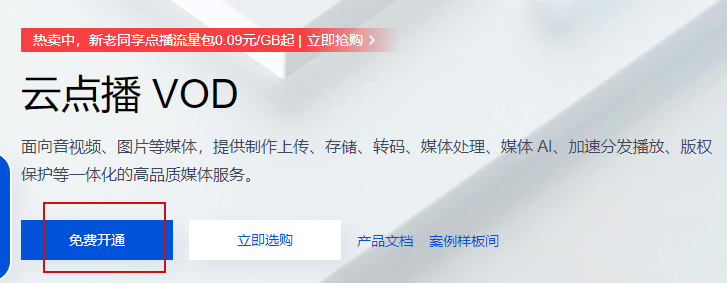
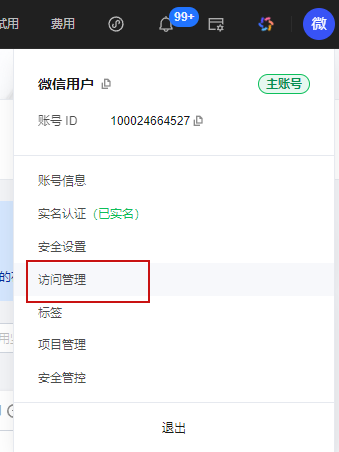
开通腾讯云云点播服务
https://cloud.tencent.com/
搜索“云点播”,进入操作界面
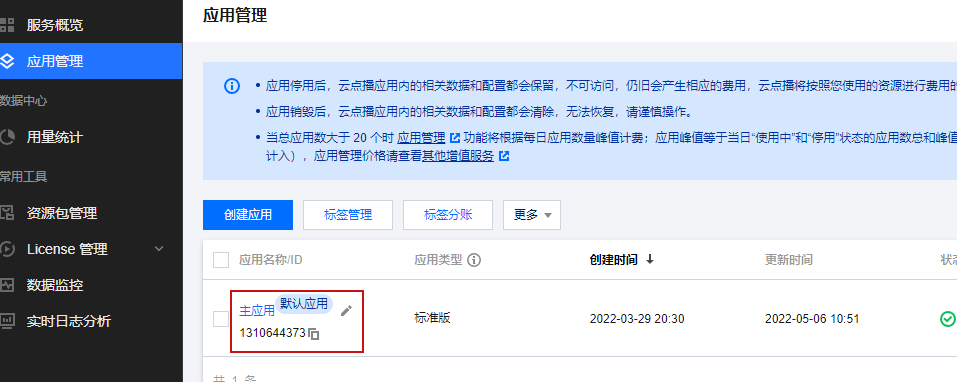
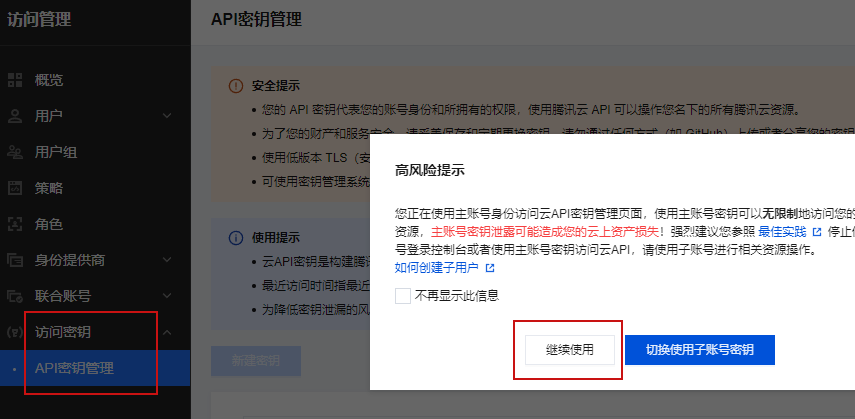
点击 应用管理
复制主应用id ,后续代码开发使用
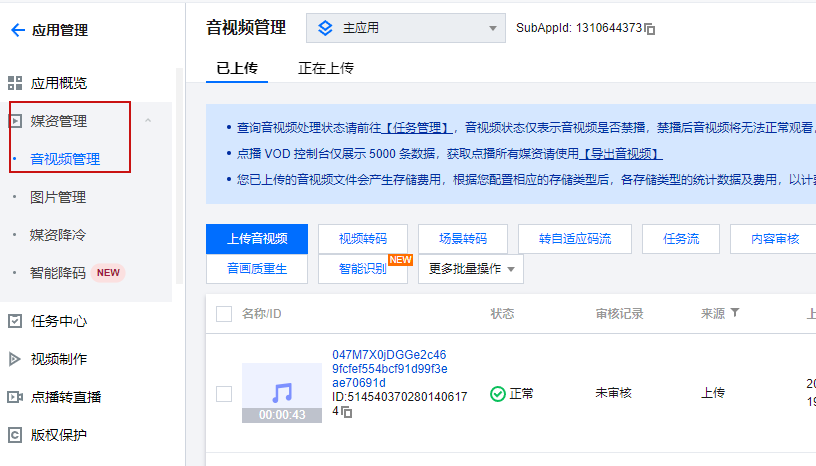
进入应用里面,点击媒资管理
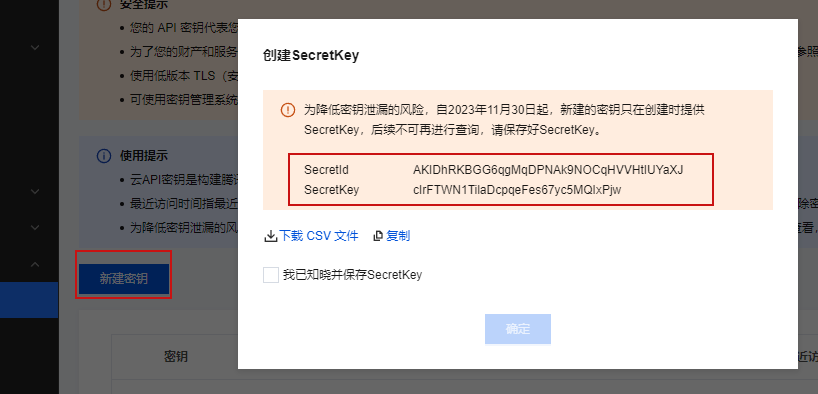
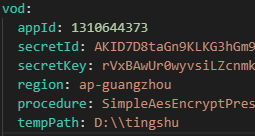
新建秘钥,在创建时候一定复制,后续无法进行查看
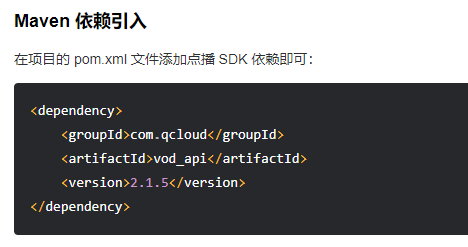
腾讯云云点播服务文档 https://cloud.tencent.com/document/product/266/10276
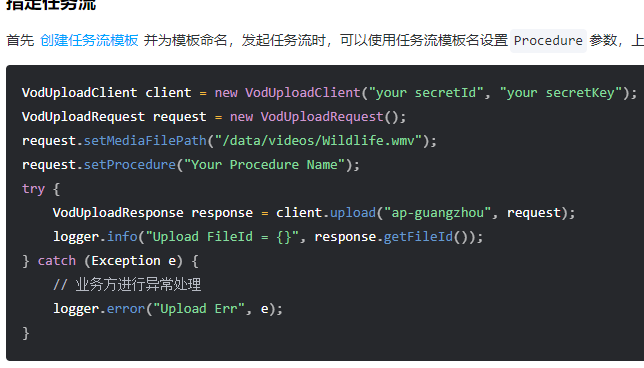
接口实现 TrackInfoApiController 1 2 3 4 5 6 7 8 9 10 11 12 13 14 15 16 17 @Autowired private VodService vodService;@Operation(summary = "上传声音") @PostMapping("uploadTrack") public Result<Map<String,Object>> uploadTrack (MultipartFile file) { Map<String,Object> map = vodService.uploadTrack(file); return Result.ok(map); }
service
1 2 3 4 5 6 7 8 9 10 11 12 13 14 15 16 17 18 19 20 21 22 23 24 25 26 27 28 29 30 31 32 33 34 @Override public Map<String, Object> uploadTrack (MultipartFile file) { String tempPath = UploadFileUtil.uploadTempPath(vodConstantProperties.getTempPath(), file); VodUploadClient client = new VodUploadClient (vodConstantProperties.getSecretId(), vodConstantProperties.getSecretKey()); VodUploadRequest request = new VodUploadRequest (); request.setMediaFilePath(tempPath); request.setProcedure(vodConstantProperties.getProcedure()); try { VodUploadResponse response = client.upload(vodConstantProperties.getRegion(), request); HashMap<String, Object> map = new HashMap <>(); map.put("mediaFileId" ,response.getFileId()); map.put("mediaUrl" ,response.getMediaUrl()); return map; } catch (Exception e) { throw new GuiguException (ResultCodeEnum.DATA_ERROR); } }
1.4 保存声音接口
保存声音,向两张表添加数据
修改一张表,修改专辑专辑里面声音数量+1
1 2 3 4 5 track_info: 声音基本信息表 track_stat:声音四个统计数据 album_info:修改操作,专辑里面声音数量+1 include_track_count
接口实现 1 2 3 4 5 6 7 8 9 10 11 @Operation(summary = "新增声音") @PostMapping("saveTrackInfo") public Result saveTrackInfo (@RequestBody @Validated TrackInfoVo trackInfoVo) { trackInfoService.saveTrackInfo(trackInfoVo); return Result.ok(); }
1 2 3 4 5 6 7 8 9 10 11 12 13 14 15 16 17 18 19 20 21 22 23 24 25 26 27 28 29 30 31 32 33 34 35 36 37 38 39 40 41 42 43 44 45 46 47 48 49 50 51 52 53 54 55 56 57 58 59 60 61 62 63 64 65 66 67 68 69 70 71 72 73 74 75 76 77 78 @Override public void saveTrackInfo (TrackInfoVo trackInfoVo) { TrackInfo trackInfo = new TrackInfo (); BeanUtils.copyProperties(trackInfoVo, trackInfo); trackInfo.setUserId(1L ); LambdaQueryWrapper<TrackInfo> wrapper = new LambdaQueryWrapper <TrackInfo>(); wrapper.select(TrackInfo::getOrderNum); wrapper.eq(TrackInfo::getAlbumId, trackInfoVo.getAlbumId()); wrapper.orderByDesc(TrackInfo::getId); wrapper.last(" limit 1 " ); TrackInfo trackInfo_ordernum = trackInfoMapper.selectOne(wrapper); int orderNum = 1 ; if (null != trackInfo_ordernum) { orderNum = trackInfo_ordernum.getOrderNum() + 1 ; } trackInfo.setOrderNum(orderNum); TrackMediaInfoVo trackMediaInfoVo = vodService.getmediaInfoByFileId(trackInfoVo.getMediaFileId()); trackInfo.setMediaDuration(trackMediaInfoVo.getDuration()); trackInfo.setMediaSize(trackMediaInfoVo.getSize()); trackInfo.setMediaUrl(trackMediaInfoVo.getMediaUrl()); trackInfo.setMediaType(trackMediaInfoVo.getType()); trackInfoMapper.insert(trackInfo); AlbumInfo albumInfo = albumInfoMapper.selectById(trackInfoVo.getAlbumId()); Integer includeTrackCount = albumInfo.getIncludeTrackCount(); albumInfo.setIncludeTrackCount(includeTrackCount+1 ); albumInfoMapper.updateById(albumInfo); this .saveTrackStat(trackInfo.getId(),SystemConstant.TRACK_STAT_PLAY); this .saveTrackStat(trackInfo.getId(),SystemConstant.TRACK_STAT_COLLECT); this .saveTrackStat(trackInfo.getId(),SystemConstant.TRACK_STAT_PRAISE); this .saveTrackStat(trackInfo.getId(),SystemConstant.TRACK_STAT_COMMENT); } private void saveTrackStat (Long trackId, String trackType) { TrackStat trackStat = new TrackStat (); trackStat.setTrackId(trackId); trackStat.setStatType(trackType); trackStat.setStatNum(0 ); this .trackStatMapper.insert(trackStat); }
2、声音列表 行变列语句 1 2 3 4 5 6 7 8 9 10 11 12 13 SELECT album.id AS albumId, album.album_title, track.id, track.track_title, MAX (IF(stat.stat_type= '0701' ,stat.stat_num,0 )) play, MAX (IF(stat.stat_type = '0702' , stat.stat_num, 0 )) collectStatNum, MAX (IF(stat.stat_type = '0703' , stat.stat_num, 0 )) praiseStatNum, MAX (IF(stat.stat_type = '0704' , stat.stat_num, 0 )) commentStatNum FROM track_info trackINNER JOIN track_stat stat ON stat.track_id= track.idINNER JOIN album_info album ON album.id = track.album_idGROUP BY track.id
接口实现 1 2 3 4 5 6 7 8 9 10 11 12 13 14 @Operation(summary = "获取当前用户声音分页列表") @PostMapping("findUserTrackPage/{page}/{limit}") public Result<IPage<TrackListVo>> findUserTrackPage (@PathVariable Long page, @PathVariable Long limit, @RequestBody TrackInfoQuery trackInfoQuery) { trackInfoQuery.setUserId(1L ); Page<TrackListVo> pageParam = new Page <>(page, limit); IPage<TrackListVo> trackListVoIPage = trackInfoService.findUserTrackPage(pageParam,trackInfoQuery); return Result.ok(trackListVoIPage); }
1 2 3 4 @Override public IPage<TrackListVo> findUserTrackPage (Page<TrackListVo> pageParam, TrackInfoQuery trackInfoQuery) { return trackInfoMapper.selectUserTrackPage(pageParam,trackInfoQuery); }
1 2 3 4 5 6 7 8 9 10 11 12 13 14 15 16 17 18 19 20 21 22 23 24 25 26 27 28 29 30 31 32 33 34 35 36 37 38 <?xml version="1.0" encoding="UTF-8" ?> <!DOCTYPE mapper PUBLIC "-//mybatis.org//DTD Mapper 3.0//EN" "http://mybatis.org/dtd/mybatis-3-mapper.dtd" > <mapper namespace ="com.atguigu.tingshu.album.mapper.TrackInfoMapper" > <select id ="selectUserTrackPage" resultType ="com.atguigu.tingshu.vo.album.TrackListVo" > select album.id as albumId, album.album_title, track.id as trackId, track.track_title, track.media_duration, if(track.cover_url is null or track.cover_url = '', album.cover_url, track.cover_url) as coverUrl, track.status, track.create_time as createTime, MAX(IF(stat.stat_type = '0701', stat.stat_num, 0)) as playStatNum, MAX(IF(stat.stat_type = '0702', stat.stat_num, 0)) as collectStatNum, MAX(IF(stat.stat_type = '0703', stat.stat_num, 0)) as praiseStatNum, MAX(IF(stat.stat_type = '0704', stat.stat_num, 0)) as commentStatNum from track_info track left join track_stat stat on stat.track_id = track.id left join album_info album on album.id = track.album_id <where > <if test ="vo.userId!=null" > track.user_id=#{vo.userId} </if > <if test ="vo.status!=null and vo.status!=''" > and track.status = #{vo.status} </if > <if test ="vo.trackTitle!=null and vo.trackTitle !=''" > and track.track_title like concat('%',#{vo.trackTitle},'%') </if > and track.is_deleted = 0 </where > group by track.id order by track.id desc </select > </mapper >
3、删除声音 分析
1 2 3 4 5 6 7 track_info: 根据声音id删除基本信息 track_stat:根据声音id删除四个统计数据 album_info:修改声音所在 专辑 声音数量-1 删除腾讯云云点播声音文件
接口实现 1 2 3 4 5 6 @DeleteMapping("removeTrackInfo/{id}") public Result removeTrackInfo (@PathVariable Long id) { trackInfoService.removeTrackInfo(id); return Result.ok(); }
1 2 3 4 5 6 7 8 9 10 11 12 13 14 15 16 17 18 19 20 21 22 23 24 25 26 @Override public void removeTrackInfo (Long trackId) { TrackInfo trackInfo = trackInfoMapper.selectById(trackId); trackInfoMapper.deleteById(trackId); Long albumId = trackInfo.getAlbumId(); AlbumInfo albumInfo = albumInfoMapper.selectById(albumId); Integer includeTrackCount = albumInfo.getIncludeTrackCount(); albumInfo.setIncludeTrackCount(includeTrackCount-1 ); albumInfoMapper.updateById(albumInfo); LambdaQueryWrapper<TrackStat> wrapper = new LambdaQueryWrapper <TrackStat>(); wrapper.eq(TrackStat::getTrackId, trackId); trackStatMapper.delete(wrapper); vodService.removeTrack(trackInfo.getMediaFileId()); }
4、修改声音 分析
**第一个接口:**根据声音id查询声音信息,进行数据回显,直接根据id查询就可以了,因为在声音基本信息表包含需要所有数据
**第二个接口:**修改声音接口
– 判断声音文件是否修改,如果声音文件修改,需要重新查询腾讯云获取到新的声音相关信息(时长等)
– 根据数据库里面存储声音fileid和前端传递过来的fileid比较,不相同,声音修改过
接口1:根据id查询声音
1 2 3 4 5 @GetMapping("getTrackInfo/{trackId}") public Result getTrackInfo (@PathVariable("trackId") Long trackId) { TrackInfo trackInfo = trackInfoService.getById(trackId); return Result.ok(trackInfo); }
接口2:修改声音
1 2 3 4 5 6 7 @PutMapping("updateTrackInfo/{trackId}") public Result updateTrackInfo (@PathVariable("trackId") Long trackId, @RequestBody @Validated TrackInfoVo trackInfoVo) { trackInfoService.updateTrackInfo(trackId,trackInfoVo); return Result.ok(); }
1 2 3 4 5 6 7 8 9 10 11 12 13 14 15 16 17 18 19 20 21 22 23 24 25 26 27 28 29 30 31 32 @Override public void updateTrackInfo (Long trackId, TrackInfoVo trackInfoVo) { TrackInfo trackInfo = trackInfoMapper.selectById(trackId); String mediaFileId_database = trackInfo.getMediaFileId(); BeanUtils.copyProperties(trackInfoVo, trackInfo); if (!trackInfoVo.getMediaFileId().equals(mediaFileId_database)) { TrackMediaInfoVo trackMediaInfoVo = vodService.getmediaInfoByFileId(trackInfoVo.getMediaFileId()); if (null ==trackMediaInfoVo){ throw new GuiguException (ResultCodeEnum.VOD_FILE_ID_ERROR); } trackInfo.setMediaUrl(trackMediaInfoVo.getMediaUrl()); trackInfo.setMediaType(trackMediaInfoVo.getType()); trackInfo.setMediaDuration(trackMediaInfoVo.getDuration()); trackInfo.setMediaSize(trackMediaInfoVo.getSize()); vodService.removeTrack(mediaFileId_database); } trackInfoMapper.updateById(trackInfo); }
5、后续功能说明
登录
1
2
public @interface Log {}
– 通俗描述:不改变源码或者很少改变源码增强功能
– 术语:切入点、通知(增强)、切面
切入点:实际增强的方法,切入点表达式
通知:五种类型,环绕通知
切面:把通知应用到切入点过程
– AOP底层使用动态代理,有接口情况使用jdk动态代理,没有接口使用cglib动态代理