记录当前用户信息和资料更新接口,并学习 Elasticsearch 的分词、倒排索引及基础操作。
本篇要点
- 补齐用户资料相关接口
- 理解搜索与倒排索引
- 练习 Elasticsearch 基础操作
内容回顾
1、用户登录业务流程
– Cookie默认会话级别,设置Cookie有效时间
– 每次请求都会携带cookie值,cookie是key-value结构
– 默认不能跨域访问,放到请求头传递
– 异步、解耦、流量削峰
– 场景:用户第一次登录时候,初始化账户使用RabbitMQ异步实现的
– 缺陷:实时一致性,因为异步
2、登录校验
3、登录接口
今天内容
1、登录其他接口
获取当前登录用户信息

1
2
3
4
5
6
7
8
9
10
11
12
13
14
15
|
@GuiguLogin(required = true)
@GetMapping("getUserInfo")
public Result getUserInfo() {
Long userId = AuthContextHolder.getUserId();
UserInfo userInfo = userInfoService.getById(userId);
UserInfoVo userInfoVo = new UserInfoVo();
BeanUtils.copyProperties(userInfo,userInfoVo);
return Result.ok(userInfoVo);
}
|
更新用户信息
1
2
3
4
5
6
7
8
9
10
11
12
13
14
15
16
17
18
19
20
21
|
@GuiguLogin
@Operation(summary = "更新用户信息")
@PostMapping("updateUser")
public Result updateUser(@RequestBody UserInfoVo userInfoVo){
Long userId = AuthContextHolder.getUserId();
UserInfo userInfo = new UserInfo();
userInfo.setId(userId);
userInfo.setNickname(userInfoVo.getNickname());
userInfo.setAvatarUrl(userInfoVo.getAvatarUrl());
userInfoService.updateById(userInfo);
return Result.ok();
}
|
2、elasticsearch
2.1 概述
简介和特点
ElasticSearch是一个基于 Lucene开源项目封装搜索引擎
ElasticSearch基于RESTful web接口
Elasticsearch是用Java开发的,Apache发布的,是当前流行的企业级搜索引擎。
Elasticsearch 8最低jdk版本要求jdk17,当前我们选择Elasticsearch版本:Elasticsearch8.x
搜索引擎(★)
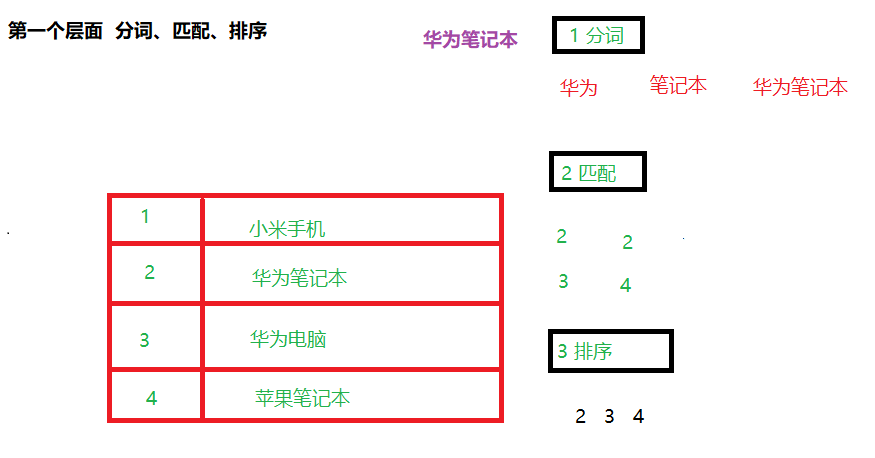
第一个层面 分词、匹配、排序
第一步分词,华为、笔记本、华为笔记本
第二步匹配,把分词之后关键词进行匹配,匹配 2 3 4, 2匹配两次
第三步排序,把匹配出来结果排序显示,根据匹配次数,排序:2 3 4
– 匹配次数术语 评分
第二个层面 倒排索引
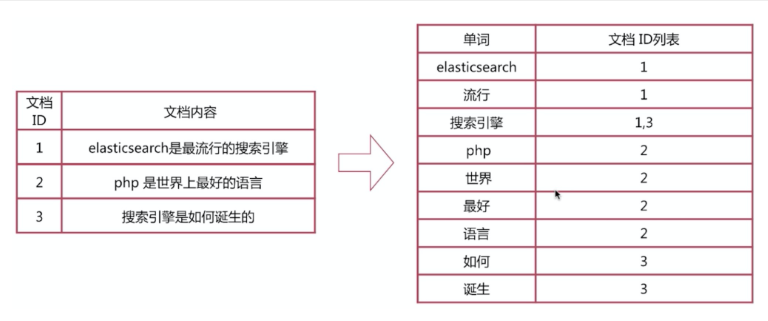
– 根据内容里面词条(关键词)创建索引,对应文档id
2.2 elasticsearch安装
– http://192.168.200.130:9200
– http://192.168.200.130:5601
2.3 elasticsearch核心概念
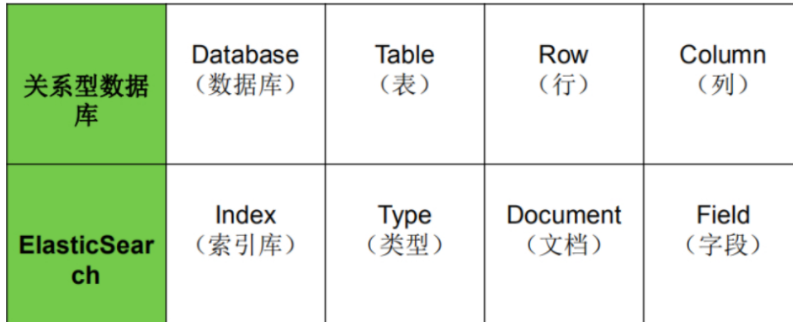
- 在es里面首先创建索引库
- 在索引库里面有默认类型(表),名称是固定的_doc,只能有一个类型,不能自己创建,也不能修改
– 只要创建索引库,自动创建类型_doc
- 在类型里面有文档(数据),是json格式
- **映射:**json格式字段类型和分词规则,比如字符串,数字等
2.4 elasticsearch基础操作
分词器使用
1
2
3
4
5
6
7
8
9
10
11
12
13
14
15
16
17
| POST _analyze
{
"analyzer": "standard",
"text": "我是中国人"
}
POST _analyze
{
"analyzer": "ik_smart",
"text": "我是中国人"
}
POST _analyze
{
"analyzer": "ik_max_word",
"text": "我是中国人"
}
|
索引库操作
1
2
3
4
5
6
7
8
9
10
11
| # 创建索引库
PUT /my_index2
# 查看所有索引库
GET /_cat/indices?v
# 查看某个索引库
GET /my_index2
# 删除索引库
DELETE /my_index2
|
文档操作
1
2
3
4
5
6
7
8
9
10
11
12
13
14
15
16
17
18
19
20
21
22
23
24
25
26
27
28
29
30
31
32
33
34
| # 创建文档
PUT /my_index/_doc/2
{
"title": "小米手机1",
"category": "小米1",
"images": "http://www.gulixueyuan.com/xm.jpg",
"price": 55555
}
# 查看文档
GET /my_index/_doc/1
# 查询所有文档
GET /my_index/_search
# 修改文档
PUT /my_index/_doc/2
{
"title": "小米手机1",
"category": "小米1",
"images": "http://www.gulixueyuan.com/xm.jpg",
"price": 9000
}
# 修改局部
POST /my_index/_update/1
{
"doc":{
"price":500
}
}
# 删除
DELETE /my_index/_doc/1
|
映射
- 类似于mysql表里面字段类型和约束等信息
- 在es设置文档中json格式字段类型和分词规则等
动态映射
- 不需要自己创建,根据添加数据类型自动创建映射
- 缺陷:使用动态映射无法设置ik分词器,只能使用默认分词器
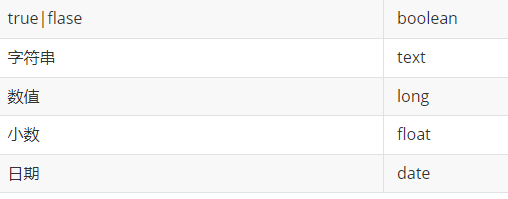
- text和 keyword都代表字符串类型,text支持分词的,keyword不支持分词。
- 数值型:long、integer、short、byte、double、float
静态映射
- 创建索引库时候,需要自己手动把映射创建出来
- 自己创建映射,可以使用ik分词器设置分词效果
1
2
3
4
5
6
7
8
9
10
11
12
13
14
15
16
17
18
19
20
21
22
23
24
25
26
27
28
29
30
31
| # 创建静态映射
DELETE /my_index1
PUT /my_index
{
"mappings": {
"properties": {
"title": {
"type": "text",
"index": true,
"store": true,
"analyzer": "ik_max_word",
"search_analyzer": "ik_smart"
},
"category": {
"type": "keyword",
"index": true,
"store": true
},
"images": {
"type": "keyword",
"index": true,
"store": true
},
"price": {
"type": "integer",
"index": true,
"store": true
}
}
}
}
|
2.5 elasticsearch高级查询
DSL语言
- DSL领域专用语言对elasticsearch里面json格式文件进行查询操作
准备
1
2
3
4
5
6
7
8
9
10
11
12
13
14
15
16
17
18
19
20
21
22
23
24
25
26
27
28
29
| PUT /my_index
{
"mappings": {
"properties": {
"title": {
"type": "text",
"index": true,
"store": true,
"analyzer": "ik_max_word",
"search_analyzer": "ik_smart"
},
"category": {
"type": "keyword",
"index": true,
"store": true
},
"images": {
"type": "keyword",
"index": true,
"store": true
},
"price": {
"type": "integer",
"index": true,
"store": true
}
}
}
}
|
1
2
3
4
5
6
7
8
| PUT /my_index/_doc/1
{"id":1,"title":"华为笔记本电脑","category":"华为","images":"http://www.gulixueyuan.com/xm.jpg","price":5388}
PUT /my_index/_doc/2
{"id":2,"title":"华为手机","category":"华为","images":"http://www.gulixueyuan.com/xm.jpg","price":5500}
PUT /my_index/_doc/3
{"id":3,"title":"VIVO手机","category":"vivo","images":"http://www.gulixueyuan.com/xm.jpg","price":3600}
|
查询语句
1
2
3
4
5
6
7
8
9
10
11
12
13
14
15
16
17
18
19
20
21
22
23
24
25
26
27
28
29
30
31
32
33
34
35
36
37
38
39
40
41
42
43
44
45
46
47
48
49
50
51
52
53
54
55
56
57
58
59
60
61
62
63
64
65
66
67
68
69
70
71
72
73
74
75
76
77
78
79
80
81
82
83
84
85
86
87
88
89
90
91
92
93
94
95
96
97
98
99
100
101
102
103
104
105
106
107
108
109
110
111
112
113
114
115
116
117
118
119
120
121
122
123
124
125
126
127
128
129
130
131
132
133
134
135
136
137
138
139
140
141
142
143
144
145
146
147
148
149
150
151
152
153
154
155
156
157
158
159
160
161
162
163
164
165
166
167
168
169
170
171
172
173
174
175
176
177
178
179
180
181
182
183
184
185
186
187
188
189
190
191
192
193
194
195
196
197
198
199
200
201
202
203
204
205
206
207
208
209
210
211
212
213
214
215
216
217
218
219
220
221
222
223
224
225
226
227
228
229
230
231
232
233
234
235
236
237
238
239
240
241
242
243
244
245
246
247
248
249
250
251
252
253
254
255
256
257
258
259
260
261
262
263
264
265
266
267
268
269
270
271
272
273
274
275
276
277
278
279
280
281
282
283
284
285
286
287
288
289
290
291
292
293
294
295
296
297
298
299
300
301
302
303
304
305
306
307
308
309
310
311
312
313
314
315
316
317
318
319
320
321
322
323
324
325
326
327
328
329
330
331
332
333
334
| # 查询所有文档
POST /my_index/_search
{
"query": {
"match_all": {}
}
}
# 匹配查询
POST /my_index/_search
{
"query": {
"match": {
"title": "华为智能手机"
}
}
}
# 多字段匹配
POST /my_index/_search
{
"query": {
"multi_match": {
"query": "华为智能手机",
"fields": ["title","category"]
}
}
}
# 关键字精确查询
# term不要使用在设置分词字段上,可能有问题
POST /my_index/_search
{
"query": {
"term": {
"category": {
"value": "华为"
}
}
}
}
# 多关键字精确匹配
GET /my_index/_search
{
"query": {
"terms": {
"category": [
"华为",
"vivo"
]
}
}
}
# 范围查询
POST /my_index/_search
{
"query": {
"range": {
"price": {
"gte": 5000,
"lte": 5600
}
}
}
}
# 指定查询字段
GET /my_index/_search
{
"query": {
"match": {
"title": "手机"
}
},
"_source": ["title","price"]
}
## 组合查询
#- must: 各个条件都必须满足,所有条件是and的关系
POST /my_index/_search
{
"query": {
"bool": {
"must": [
{
"match": {
"title": "华为"
}
},
{
"range": {
"price": {
"gte": 3000,
"lte": 6000
}
}
}
]
}
}
}
#- should: 各个条件有一个满足即可,即各条件是or的关系
POST /my_index/_search
{
"query": {
"bool": {
"should": [
{
"match": {
"title": "华为"
}
},
{
"range": {
"price": {
"gte": 3000,
"lte": 5000
}
}
}
]
}
}
}
#- must_not: 不满足所有条件,即各条件是not的关系
POST /my_index/_search
{
"query": {
"bool": {
"must_not": [
{
"match": {
"title": "华为"
}
},
{
"range": {
"price": {
"gte": 3000,
"lte": 5000
}
}
}
]
}
}
}
#- filter: 与must效果等同,但是它不计算得分,效率更高点。
POST /my_index/_search
{
"query": {
"bool": {
"filter": [
{
"match": {
"title": "华为"
}
}
]
}
}
}
## 聚合查询
# max最大值
POST /my_index/_search
{
"query": {
"match_all": {}
},
"size": 0,
"aggs": {
"max_price": {
"max": {
"field": "price"
}
}
}
}
# min 最小值
POST /my_index/_search
{
"query": {
"match_all": {}
},
"size": 0,
"aggs": {
"min_price": {
"min": {
"field": "price"
}
}
}
}
# avg 平均值
POST /my_index/_search
{
"query": {
"match_all": {}
},
"size": 0,
"aggs": {
"avg_price": {
"avg": {
"field": "price"
}
}
}
}
# sum 求和
POST /my_index/_search
{
"query": {
"match_all": {}
},
"size": 0,
"aggs": {
"sum_price": {
"sum": {
"field": "price"
}
}
}
}
# stats 实现多种效果
POST /my_index/_search
{
"query": {
"match_all": {}
},
"size": 0,
"aggs": {
"stats_price": {
"stats": {
"field": "price"
}
}
}
}
# terms分组
POST /my_index/_search
{
"query": {
"match_all": {}
},
"size": 0,
"aggs": {
"groupby_category": {
"terms": {
"field": "category",
"size": 10
}
}
}
}
# 排序
POST /my_index/_search
{
"query": {
"bool": {
"must": [
{
"match": {
"title": "华为"
}
}
]
}
},
"sort": [
{
"price": {
"order": "asc"
}
},
{
"_score": {
"order": "desc"
}
}
]
}
# 分页查询
POST /my_index/_search
{
"query": {
"match_all": {}
},
"from": 0,
"size": 2
}
# 分页计算公式
# from开始位置 (当前页-1)* 每页记录数
# size每页记录数
POST /my_index/_search
{
"query": {
"match_all": {}
},
"from": 0,
"size": 2
}
# 高亮显示
POST /my_index/_search
{
"query": {
"match": {
"title": "华为"
}
},
"highlight": {
"fields": {
"title": {}
},
"pre_tags": ["<font color:#e4393c>"],
"post_tags": ["</font>"]
}
}
|
1
2
3
4
5
6
7
8
9
10
11
12
13
14
15
16
17
18
19
20
21
22
23
24
25
26
27
28
29
30
31
32
33
34
35
36
37
38
39
40
41
42
43
44
45
46
47
48
49
50
51
52
53
54
55
56
57
58
59
60
61
62
63
64
65
66
| PUT my_comment_index
{
"mappings": {
"properties": {
"comments": {
"type": "nested"
}
}
}
}
PUT my_comment_index/_doc/1
{
"title": "狂人日记",
"body": "《狂人日记》是一篇象征性和寓意很强的小说,当时,鲁迅对中国国民精神的麻木愚昧颇感痛切。",
"comments": [
{
"name": "张三",
"age": 34,
"rating": 8,
"comment": "非常棒的文章",
"commented_on": "30 Nov 2023"
},
{
"name": "李四",
"age": 38,
"rating": 9,
"comment": "文章非常好",
"commented_on": "25 Nov 2022"
},
{
"name": "王五",
"age": 33,
"rating": 7,
"comment": "手动点赞",
"commented_on": "20 Nov 2021"
}
]
}
GET /my_comment_index/_search
{
"query": {
"nested": {
"path": "comments",
"query": {
"bool": {
"must": [
{
"match": {
"comments.name": "李四"
}
},
{
"match": {
"comments.age": 34
}
}
]
}
}
}
}
}
|
2.6 Java Api操作ES
概述
有两种方式可以操作
- 第一种 使用Elasticsearch提供的原生的api操作
– 实现DSL查询操作使用原生api方式实现
- 第二种 使用SpringBoot整合Elasticsearch
– 实现基本增删改查操作使用SpringBoot实现
1
2
3
4
5
6
7
8
9
10
11
12
13
14
15
16
17
18
19
20
21
22
23
24
25
26
27
28
29
30
31
32
33
| @SpringBootTest
public class ElasticsearchDemoApplicationTests {
@Autowired
private ElasticsearchClient elasticsearchClient;
@Test
public void contextLoads() throws Exception {
SearchResponse<Object> search =
elasticsearchClient.search(
s->s.index("my_index")
.query(
f->f.match(
f1->f1.field("title").query("华为手机")
)
)
, Object.class);
for (Hit<Object> hit : search.hits().hits()) {
System.out.println(hit.source());
}
}
}
|