记录专辑关键词和分类属性筛选、分页排序与高亮,以及首页分类和推荐数据接口。
本篇要点
- 组合关键词与分类属性条件
- 处理分页、排序和高亮
- 梳理首页数据接口
今天内容
1、专辑检索接口
分析
DSL语句
1
2
3
4
5
6
7
8
9
10
11
12
13
14
15
16
17
18
19
20
21
22
23
24
25
26
27
28
29
30
31
32
33
34
35
36
37
38
39
40
41
42
43
44
45
46
47
48
49
50
51
52
53
54
55
56
57
58
59
60
61
62
63
64
65
66
67
68
69
70
71
72
73
74
75
76
77
78
79
80
81
82
83
84
85
86
87
| # 根据关键词与分类属性Id 过滤
GET /albuminfo/_search
{
"query": {
"bool": {
"should": [
{
"match": {
"albumTitle": "小说"
}
},
{
"match": {
"albumIntro": "小说"
}
}
],
"filter": [
{
"term": {
"category3Id": "1152"
}
}
]
}
}
}
# 根据属性与属性值Id 进行过滤
GET /albuminfo/_search
{
"query": {
"bool": {
"filter": [
{
"nested": {
"path": "attributeValueIndexList",
"query": {
"bool": {
"must": [
{
"term": {
"attributeValueIndexList.attributeId": {
"value": "15"
}
}
},
{
"term": {
"attributeValueIndexList.valueId": {
"value": "32"
}
}
}
]
}
}
}
}
]
}
}
}
# 分页-排序-高亮
GET /albuminfo/_search
{
"query": {
"match": {
"albumTitle": "小说"
}
},
"from": 0,
"size": 20,
"sort": [
{
"playStatNum": {
"order": "desc"
}
}
],
"highlight": {
"fields": {"albumTitle": {}},
"pre_tags": ["<font color='red'>"],
"post_tags": ["</font>"]
}
}
|
– AlbumIndexQuery :接收前端传递过来数据
– AlbumSearchResponseVo:封装返回结果
- 在service-search模块编写专辑检索接口
SearchApiController
1
2
3
4
5
6
7
8
9
10
|
@Operation(summary = "专辑搜索列表")
@PostMapping
public Result search(@RequestBody AlbumIndexQuery albumIndexQuery)
throws IOException {
AlbumSearchResponseVo albumSearchResponseVo =
searchService.search(albumIndexQuery);
return Result.ok(albumSearchResponseVo);
}
|
(总记录数 + 每页显示记录数 -1)/ 每页显示记录数
service
基础方法
1
2
3
4
5
6
7
8
9
10
11
12
13
14
15
16
17
18
19
20
21
22
|
@Override
public AlbumSearchResponseVo search(AlbumIndexQuery albumIndexQuery) throws Exception {
SearchRequest request = this.buildQueryDsl(albumIndexQuery);
SearchResponse<AlbumInfoIndex> response =
elasticsearchClient.search(request, AlbumInfoIndex.class);
AlbumSearchResponseVo searchResponseVo = this.parseSearchResult(response);
searchResponseVo.setPageNo(albumIndexQuery.getPageNo());
searchResponseVo.setPageSize(albumIndexQuery.getPageSize());
long totalPages = (searchResponseVo.getTotal() + albumIndexQuery.getPageSize() - 1) / albumIndexQuery.getPageSize();
searchResponseVo.setTotalPages(totalPages);
return searchResponseVo;
}
|
构建DSL语句方法
1
2
3
4
5
6
7
8
9
10
11
12
13
14
15
16
17
18
19
20
21
22
23
24
25
26
27
28
29
30
31
32
33
34
35
36
37
38
39
40
41
42
43
44
45
46
47
48
49
50
51
52
53
54
55
56
57
58
59
60
61
62
63
64
65
66
67
68
69
70
71
72
73
74
75
76
77
78
79
80
81
82
83
84
85
86
87
88
89
90
91
92
93
94
95
96
97
98
99
100
101
102
103
104
105
106
107
108
109
110
111
|
private SearchRequest buildQueryDsl(AlbumIndexQuery albumIndexQuery) {
SearchRequest.Builder requestBuilder = new SearchRequest.Builder();
BoolQuery.Builder boolQuery = new BoolQuery.Builder();
String keyword = albumIndexQuery.getKeyword();
if(!StringUtils.isEmpty(keyword)) {
boolQuery.should(s->s.match(f->f.field("albumTitle").query(keyword)));
boolQuery.should(s->s.match(f->f.field("albumIntro").query(keyword)));
requestBuilder.highlight(h->h.fields("albumTitle",
f->f.preTags("<span style=color:red>").postTags("</span>")));
}
Long category3Id = albumIndexQuery.getCategory3Id();
if(!StringUtils.isEmpty(category3Id)) {
boolQuery.filter(s->s.term(f->f.field("category3Id").value(category3Id)));
}
Long category1Id = albumIndexQuery.getCategory1Id();
if (!StringUtils.isEmpty(category1Id)) {
boolQuery.filter(f -> f.term(s -> s.field("category1Id").value(category1Id)));
}
Long category2Id = albumIndexQuery.getCategory2Id();
if (!StringUtils.isEmpty(category2Id)) {
boolQuery.filter(f -> f.term(s -> s.field("category2Id").value(category2Id)));
}
List<String> attributeList = albumIndexQuery.getAttributeList();
if(!CollectionUtils.isEmpty(attributeList)) {
for(String attribute : attributeList) {
String[] split = attribute.split(":");
if (null != split && split.length == 2) {
NestedQuery nestedQuery = NestedQuery.of(
f->f.path("attributeValueIndexList")
.query( q->q.bool(m->m.must(
t->t.term(
f1->f1.field("attributeValueIndexList.attributeId")
.value(split[0]))).must(
t->t.term(
f1->f1.field("attributeValueIndexList.valueId").value(split[1])
))
)));
boolQuery.filter(f->f.nested(nestedQuery));
}
}
}
String order = albumIndexQuery.getOrder();
if(!StringUtils.isEmpty(order)) {
String[] split = order.split(":");
String orderField = "";
String sort = "";
if(split != null && split.length == 2) {
switch (split[0]) {
case "1":
orderField="hotScore";
break;
case "2":
orderField = "playStatNum";
break;
case "3":
orderField = "createTime";
break;
}
sort = split[1];
}
String finalSort = sort;
String finalOrderField = orderField;
requestBuilder.sort(f->f.field(f1->f1.field(finalOrderField)
.order("asc".equals(finalSort)?SortOrder.Asc:SortOrder.Desc)));
} else {
requestBuilder.sort(f->f.field(o->o.field("_score").order(SortOrder.Desc)));
}
requestBuilder.source(s->s.filter(f->f.excludes("attributeValueIndexList")));
Integer from = (albumIndexQuery.getPageNo() - 1)*albumIndexQuery.getPageSize();
requestBuilder.from(from);
requestBuilder.size(albumIndexQuery.getPageSize());
requestBuilder.index("albuminfo")
.query(f->f.bool(boolQuery.build()));
SearchRequest searchRequest = requestBuilder.build();
System.out.println("dsl: "+searchRequest.toString());
return searchRequest;
}
|
封装返回结果方法
1
2
3
4
5
6
7
8
9
10
11
12
13
14
15
16
17
18
19
20
21
22
23
24
25
26
27
28
29
30
31
32
33
34
|
private AlbumSearchResponseVo
parseSearchResult(SearchResponse<AlbumInfoIndex> response) {
AlbumSearchResponseVo searchResponseVo = new AlbumSearchResponseVo();
HitsMetadata<AlbumInfoIndex> hits = response.hits();
long totalValue = hits.total().value();
searchResponseVo.setTotal(totalValue);
List<Hit<AlbumInfoIndex>> subHist = hits.hits();
if(!CollectionUtils.isEmpty(subHist)) {
List<AlbumInfoIndexVo> list = subHist.stream().map(albumInfoIndexHit -> {
AlbumInfoIndexVo albumInfoIndexVo = new AlbumInfoIndexVo();
AlbumInfoIndex albumInfoIndex = albumInfoIndexHit.source();
BeanUtils.copyProperties(albumInfoIndex, albumInfoIndexVo);
if (null != albumInfoIndexHit.highlight().get("albumTitle")){
String albumTitle = albumInfoIndexHit
.highlight().get("albumTitle").get(0);
albumInfoIndexVo.setAlbumTitle(albumTitle);
}
return albumInfoIndexVo;
}).collect(Collectors.toList());
searchResponseVo.setList(list);
}
return searchResponseVo;
}
|
2、首页数据接口
分析
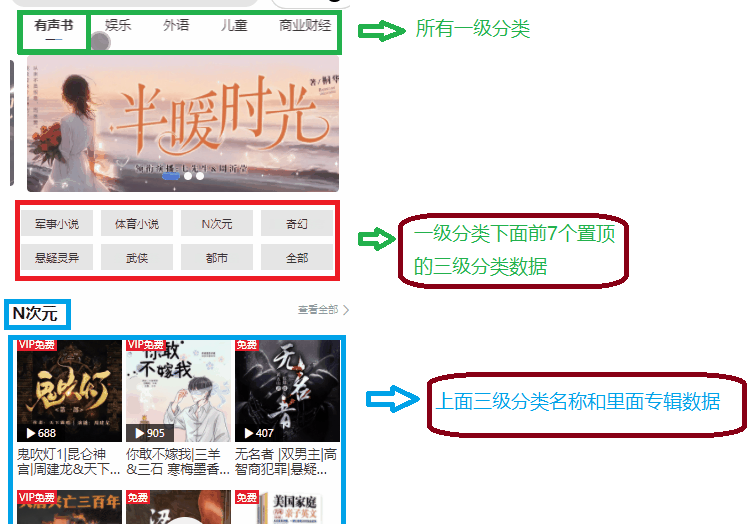
接口分析
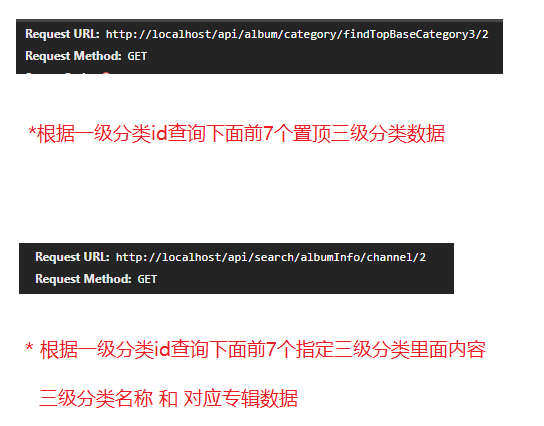
根据一级分类id查询前7个置顶三级分类
实现过程分析
1
2
3
4
5
6
7
8
9
10
| # 根据一级分类id查询前7个置顶三级分类
# 第一步 根据一级分类id查询下面所有二级分类id
SELECT bc.id FROM base_category2 bc WHERE bc.category1_id=1;
# 101 102 103
# 第二步 根据第一步查询出来所有二级分类id,查询下面三级分类数据,
# 有条件是否置顶 is_top=1,
SELECT * FROM base_category3 bc3 WHERE bc3.category2_id IN(101,102,103)
AND bc3.is_top=1 LIMIT 7
|
在service-album模块BaseCategoryApiController
1
2
3
4
5
6
7
8
9
10
11
12
13
|
@Operation(summary = "获取一级分类下置顶到频道页的三级分类列表")
@GetMapping("findTopBaseCategory3/{category1Id}")
public Result<List<BaseCategory3>>
findTopBaseCategory3(@PathVariable Long category1Id) {
List<BaseCategory3> list =
baseCategoryService.selectTopBaseCategory3(category1Id);
return Result.ok(list);
}
|
在service-album模块service
1
2
3
4
5
6
7
8
9
10
11
12
13
14
15
16
17
18
19
20
21
22
23
24
25
26
27
28
|
@Override
public List<BaseCategory3> selectTopBaseCategory3(Long category1Id) {
LambdaQueryWrapper<BaseCategory2> wrapper2 = new LambdaQueryWrapper<>();
wrapper2.eq(BaseCategory2::getCategory1Id, category1Id);
List<BaseCategory2> baseCategory2List =
baseCategory2Mapper.selectList(wrapper2);
List<Long> category2IdList = baseCategory2List.stream()
.map(BaseCategory2::getId)
.collect(Collectors.toList());
LambdaQueryWrapper<BaseCategory3> wrapper3 = new LambdaQueryWrapper<>();
wrapper3.in(BaseCategory3::getCategory2Id, category2IdList);
wrapper3.eq(BaseCategory3::getIsTop,1);
wrapper3.last(" limit 7");
List<BaseCategory3> baseCategory3List = baseCategory3Mapper.selectList(wrapper3);
return baseCategory3List;
}
|
远程调用定义
1
2
3
4
5
6
7
8
9
10
11
12
13
14
15
16
17
18
19
| @FeignClient(value = "service-album", fallback = CategoryDegradeFeignClient.class)
public interface CategoryFeignClient {
@GetMapping("api/album/category/getCategoryView/{category3Id}")
Result<BaseCategoryView> getCategoryView(@PathVariable Long category3Id);
@GetMapping("api/album/category/findTopBaseCategory3/{category1Id}")
Result<List<BaseCategory3>> findTopBaseCategory3(@PathVariable("category1Id") Long category1Id);
}
|
首页数据接口
在service-search模块SearchApiController
1
2
3
4
5
6
7
8
9
10
11
12
|
@Operation(summary = "获取频道页数据")
@GetMapping("channel/{category1Id}")
public Result channel(@PathVariable Long category1Id) {
List<Map<String, Object>> mapList = searchService.channel(category1Id);
return Result.ok(mapList);
}
|
service
1
2
3
4
5
6
7
8
9
10
11
12
13
14
15
16
17
18
19
20
21
22
23
24
25
26
27
28
29
30
31
32
33
34
35
36
37
38
39
40
41
42
43
44
45
46
47
48
49
50
51
52
53
54
55
56
57
58
59
60
61
62
63
64
65
66
67
68
69
70
71
72
73
74
75
76
77
78
79
80
81
82
83
84
85
86
|
@Override
public List<Map<String, Object>> channel(Long category1Id) throws Exception {
Result<List<BaseCategory3>> topBaseCategory3Result =
categoryFeignClient.findTopBaseCategory3(category1Id);
List<BaseCategory3> baseCategory3List = topBaseCategory3Result.getData();
Map<Long, BaseCategory3> category3Map = baseCategory3List.stream().collect(
Collectors.toMap(BaseCategory3::getId,
BaseCategory3 -> BaseCategory3));
List<Long> category3IdList =
baseCategory3List.stream().map(BaseCategory3::getId)
.collect(Collectors.toList());
List<FieldValue> idValueList =
category3IdList.stream().map(id -> FieldValue.of(id))
.collect(Collectors.toList());
SearchRequest.Builder requestBuilder = new SearchRequest.Builder();
requestBuilder.index("albuminfo").query(
q->q.terms(
f->f.field("category3Id")
.terms(
new TermsQueryField.Builder()
.value(idValueList).build())
));
requestBuilder.aggregations("groupByCategory3IdAgg",
a->a.terms(f->f.field("category3Id").size(10))
.aggregations("topTenHotScoreAgg",
a1->a1.topHits(
s->s.size(6)
.sort(o->o.field(o1->o1.field("hotScore")
.order(SortOrder.Desc)))))
);
SearchResponse<AlbumInfoIndex> response =
elasticsearchClient.search(requestBuilder.build(),
AlbumInfoIndex.class);
List<Map<String, Object>> result = new ArrayList<>();
Aggregate groupByCategory3IdAgg =
response.aggregations().get("groupByCategory3IdAgg");
groupByCategory3IdAgg.lterms().buckets().array().forEach(item ->{
List<AlbumInfoIndex> albumInfoIndexList = new ArrayList<>();
long category3Id = item.key();
Aggregate topTenHotScoreAgg = item.aggregations().get("topTenHotScoreAgg");
topTenHotScoreAgg.topHits().hits().hits().forEach(hit->{
String json = hit.source().toString();
AlbumInfoIndex albumInfoIndex = JSON.parseObject(json, AlbumInfoIndex.class);
albumInfoIndexList.add(albumInfoIndex);
});
Map<String, Object> map = new HashMap<>();
map.put("baseCategory3",category3Map.get(category3Id));
map.put("list",albumInfoIndexList);
result.add(map);
});
return result;
}
|