整理一级分类下的完整分类树、检索关键词自动补全、Logstash 以及专辑详情接口的学习记录。
本篇要点
组装一级分类下的二三级分类
实现关键词自动补全
了解日志与专辑详情接口
内容回顾 1、专辑检索接口
2、根据一级id查询前7个置顶三级数据 3、首页数据接口 今天内容 1、根据一级分类Id获取全部分类信息 分析
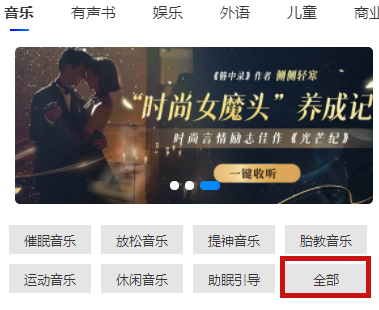
在首页,点击某个一级分类,比如点击音乐,点击全部,根据一级分类id查询一级分类下面所有二级和三级分类
1
2
3
4
5
6
7
8
9
10
11
12
13
14
15
16
17
18
19
20
21
22
23
24
25
26
27
{ 一级分类id: 1 一级分类名称:音乐 child: [ { 二级分类id:11 二级分类名称:音乐音效 child: [ { 三级分类id:111 三级分类名称:运动音乐 } ] } ] } # 1 根据一级分类id查询一级分类数据,进行封装 # 2 根据一级分类id查询下面的二级和三级分类数据 # 查询base_category_view视图 select * from base_category_view bcv where bcv.category1_id= 1 # 3 从第二步查询出来的数据获取所有二级分类数据 # 根据二级分类id进行分组,获取每组里面二级分类id和名称 # 4 从上一步每组里面获取每个二级分类里面三级分类数据
接口实现 在service-album模块添加接口
1 2 3 4 5 6 7 8 9 10 11 @Operation(summary = "根据一级分类id获取全部分类信息") @GetMapping("getBaseCategoryList/{category1Id}") public Result<JSONObject> getBaseCategoryList (@PathVariable Long category1Id) { JSONObject jsonObject = baseCategoryService.getBaseCategoryList(category1Id); return Result.ok(jsonObject); }
1 2 3 4 5 6 7 8 9 10 11 12 13 14 15 16 17 18 19 20 21 22 23 24 25 26 27 28 29 30 31 32 33 34 35 36 37 38 39 40 41 42 43 44 45 46 47 48 49 50 51 52 53 54 55 56 57 58 59 60 61 62 @Override public JSONObject getBaseCategoryListByCategory1Id (Long category1Id) { BaseCategory1 baseCategory1 = baseCategory1Mapper.selectById(category1Id); JSONObject category1 = new JSONObject (); category1.put("categoryId" , category1Id); category1.put("categoryName" , baseCategory1.getName()); LambdaQueryWrapper<BaseCategoryView> wrapper = new LambdaQueryWrapper <>(); wrapper.eq(BaseCategoryView::getCategory1Id, category1Id); List<BaseCategoryView> baseCategoryViewList = baseCategoryViewMapper.selectList(wrapper); Map<Long, List<BaseCategoryView>> map = baseCategoryViewList.stream().collect( Collectors.groupingBy(BaseCategoryView::getCategory2Id)); List<JSONObject> category2Child = new ArrayList <>(); map.forEach((k, v) -> { Long categoryId2 = k; List<BaseCategoryView> baseCategoryViewList2 = v; JSONObject category2 = new JSONObject (); category2.put("categoryId" , categoryId2); category2.put("categoryName" , baseCategoryViewList2.get(0 ).getCategory2Name()); List<JSONObject> category3Child = new ArrayList <>(); baseCategoryViewList2.stream().forEach(category3View -> { JSONObject category3 = new JSONObject (); category3.put("categoryId" , category3View.getCategory3Id()); category3.put("categoryName" , category3View.getCategory3Name()); category3Child.add(category3); }); category2.put("categoryChild" ,category3Child); category2Child.add(category2); }); category1.put("categoryChild" ,category2Child); return category1; }
2、专辑检索关键字自动补全 分析
前置知识
1
2
3
4
5
6
7
8
9
10
11
12
13
14
15
16
GET test/ _search{ "_source": false , "suggest": { "completer": { "prefix": "foe", "completion": { "field": "suggest", "skip_duplicates": true , "fuzzy": { "fuzziness": "auto" } } } } }
实现 创建并初始化索引库
1
2
3
4
5
6
7
8
9
10
11
12
13
14
15
16
17
18
19
20
@Data @Document(indexName = "suggestinfo") @JsonIgnoreProperties(ignoreUnknown = true) public class SuggestIndex { @Id private String id; @Field(type = FieldType.Text, analyzer = "standard") private String title; @CompletionField(analyzer = "standard", searchAnalyzer = "standard", maxInputLength = 20) private Completion keyword; @CompletionField(analyzer = "standard", searchAnalyzer = "standard", maxInputLength = 20) private Completion keywordPinyin; @CompletionField(analyzer = "standard", searchAnalyzer = "standard", maxInputLength = 20) private Completion keywordSequence; }
1
2
3
public interface SuggestIndexRepository extends ElasticsearchRepository <SuggestIndex, String> { }
1 2 3 4 5 6 7 8 9 10 11 12 13 14 SuggestIndex suggestIndex = new SuggestIndex ();suggestIndex.setId(UUID.randomUUID().toString().replaceAll("-" ,"" )); suggestIndex.setTitle(albumInfoIndex.getAlbumTitle()); suggestIndex.setKeyword(new Completion (new String []{albumInfoIndex.getAlbumTitle()})); suggestIndex.setKeywordPinyin(new Completion (new String []{PinYinUtils.toHanyuPinyin(albumInfoIndex.getAlbumTitle())})); suggestIndex.setKeywordSequence(new Completion (new String []{PinYinUtils.getFirstLetter(albumInfoIndex.getAlbumTitle())})); this .suggestIndexRepository.save(suggestIndex);
编写自动补全接口
1
2
3
4
5
6
7
8
9
10
11
12
13
14
15
16
17
public class SearchApiController { @Autowired private SearchService searchService; @Operation(summary = "关键字自动补全") @GetMapping("completeSuggest/{keyword}") public Result completeSuggest (@PathVariable String keyword) { List<String> list = searchService.completeSuggest(keyword); return Result.ok(list); } }
1 2 3 4 5 6 7 8 9 10 11 12 13 14 15 16 17 18 19 20 21 22 23 24 25 26 27 28 29 30 31 32 33 34 35 36 37 38 39 40 41 42 43 44 45 46 47 48 49 50 51 52 53 54 55 56 57 58 59 60 61 62 63 64 65 66 67 68 69 @Override public List<String> completeSuggest (String keyword) throws Exception { SearchRequest.Builder requestBuilder = new SearchRequest .Builder(); requestBuilder.index("suggestinfo" ).suggest( s->s.suggesters("suggestionKeyword" , f->f.prefix(keyword).completion( c->c.field("keyword" ) .skipDuplicates(true ) .size(10 ) .fuzzy(f1->f1.fuzziness("auto" )))) .suggesters("suggestionkeywordPinyin" , f->f.prefix(keyword).completion( c->c.field("keywordPinyin" ) .skipDuplicates(true ) .size(10 ) .fuzzy(f1->f1.fuzziness("auto" )))) .suggesters("suggestionkeywordSequence" ,f->f.prefix(keyword).completion( c->c.field("keywordSequence" ).skipDuplicates(true ).size(10 ) .fuzzy(z->z.fuzziness("auto" )) )) ); SearchResponse<SuggestIndex> response = elasticsearchClient.search(requestBuilder.build(), SuggestIndex.class); HashSet<String> titleSet = new HashSet <>(); titleSet.addAll(this .parseResultData(response,"suggestionKeyword" )); titleSet.addAll(this .parseResultData(response,"suggestionkeywordPinyin" )); titleSet.addAll(this .parseResultData(response,"suggestionkeywordSequence" )); if (titleSet.size()<10 ) { SearchResponse<SuggestIndex> searchResponse = elasticsearchClient.search(s -> s.index("suggestinfo" ) .query(f -> f.match(m -> m.field("title" ).query(keyword))) , SuggestIndex.class); for (Hit<SuggestIndex> hit : response.hits().hits()) { SuggestIndex suggestIndex = hit.source(); titleSet.add(suggestIndex.getTitle()); if (titleSet.size()==10 ){ break ; } } } return new ArrayList <>(titleSet); } private List<String> parseResultData (SearchResponse<SuggestIndex> response, String suggestionKeyword) { List<String> suggestList = new ArrayList <>(); Map<String, List<Suggestion<SuggestIndex>>> map = response.suggest(); List<Suggestion<SuggestIndex>> suggestions = map.get(suggestionKeyword); suggestions.forEach(item -> { CompletionSuggest<SuggestIndex> completionSuggest = item.completion(); completionSuggest.options().forEach(it -> { SuggestIndex suggestIndex = it.source(); suggestList.add(suggestIndex.getTitle()); }); }); return suggestList; }
3、日志工具logstash(面试)
– E:es搜索引擎,索引库
– K:kibana连接工具,对es数据进行分析(操作es里面数据查看)
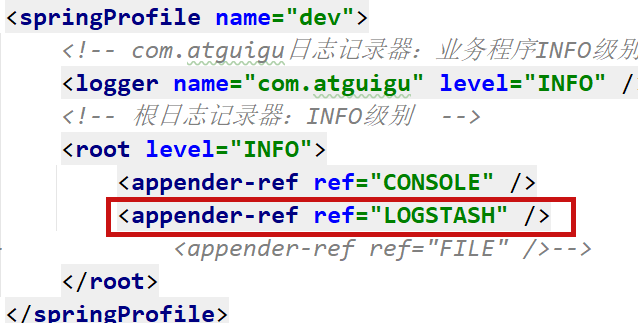
– L:logstash日志工具,收集项目的日志信息,把日志信息存储到es里面
使用logstash收集项目日志,把日志存储到es里面,之后使用kibana分析es日志数据
1、第一步 docker安装logstash服务,配置存储es索引库路径
第一步:拉取镜像
docker pull logstash:8.5.0
第二步:需要提前在linux服务器上环境,内容如下
mkdir -p /mnt/docker/elk/logstash/pipeline
mkdir -p /mnt/docker/elk/logstash/config
1
2
3
4
5
6
7
8
9
10
11
12
13
14
15
16
17
18
19
20
21
22
# 第一步: cat > /mnt/docker/elk/logstash/pipeline/logstash.conf << EOF input { tcp { mode => "server" host => "0.0.0.0" port => 5044 codec => json_lines } } output { elasticsearch { hosts => "192.168.200.130:9200" index => "ts-%{+YYYY.MM.dd}" } } EOF # 第二步: cat > /mnt/docker/elk/logstash/config/logstash.yml << EOF http.host: "0.0.0.0" xpack.monitoring.elasticsearch.hosts: [ "http://192.168.200.130:9200" ] EOF
第三步:创建容器
1 docker run -d --name logstash -m 1000M --restart=always -p 5044:5044 -p 9600:9600 --privileged=true -e ES_JAVA_OPTS="-Duser.timezone=Asia/Shanghai" -v /mnt/docker/elk/logstash/pipeline/logstash.conf:/usr/share/logstash/pipeline/logstash.conf -v /mnt/docker/elk/logstash/config/logstash.yml:/usr/share/logstash/config/logstash.yml logstash:8.5.0
2、第二步 SpringBoot整合logstash,修改SpringBoot日志配置文件
在logback-spring.xml文件添加logstash配置
1 2 3 4 5 6 <appender name ="LOGSTASH" class ="net.logstash.logback.appender.LogstashTcpSocketAppender" > <destination > 192.168.200.130:5044</destination > <encoder charset ="UTF-8" class ="net.logstash.logback.encoder.LogstashEncoder" /> </appender >
3、第三步 引入logstash依赖在service模块pom文件
1 2 3 4 5 <dependency > <groupId > net.logstash.logback</groupId > <artifactId > logstash-logback-encoder</artifactId > <version > 5.1</version > </dependency >
4、第四步 使用kibana分析日志数据
1
2
3
4
5
6
7
8
post / ts-2025.10 .29 / _search { "query":{ "match": { "level": "ERROR" } } }
4、专辑详情(完成部分)
分析
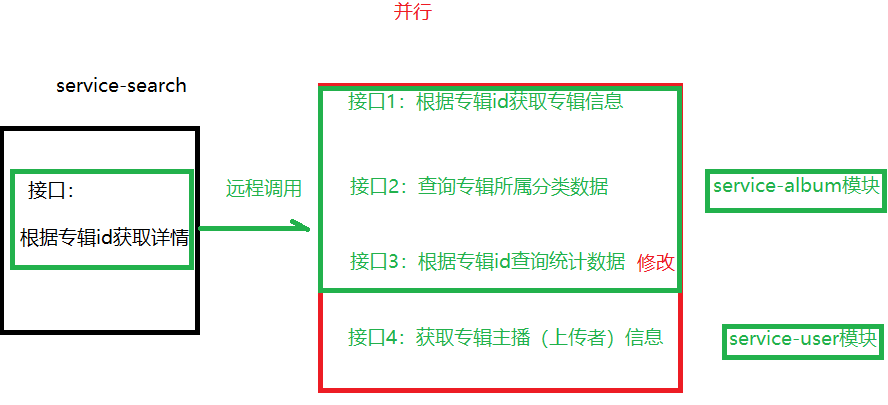
基础功能(不带声音数据) 远程调用接口
创建四个远程调用接口
根据专辑id获取四个统计数据接口
1 2 3 4 5 6 7 8 9 10 11 12 13 @Operation(summary = "获取到专辑统计信息") @GetMapping("/getAlbumStatVo/{albumId}") public Result getAlbumStatVo (@PathVariable Long albumId) { AlbumStatVo albumStatVo = this .albumInfoService.getAlbumStatVoByAlbumId(albumId); return Result.ok(albumStatVo); }
1
2
3
4
5
@Override public AlbumStatVo getAlbumStatVoByAlbumId (Long albumId) { return albumStatMapper.getAlbumStatVoByAlbumId(albumId); }
1 2 3 4 5 6 7 8 9 10 <select id ="getAlbumStatVoByAlbumId" resultType ="com.atguigu.tingshu.vo.album.AlbumStatVo" > select stat.album_id, max(if(stat.stat_type = '0401',stat.stat_num,0)) playStatNum, max(if(stat.stat_type = '0402',stat.stat_num,0)) subscribeStatNum, max(if(stat.stat_type = '0403',stat.stat_num,0)) buyStatNum, max(if(stat.stat_type = '0404',stat.stat_num,0)) commentStatNum from album_stat stat where album_id = #{albumId} and stat.is_deleted = 0 group by stat.album_id </select >
1 2 3 4 5 6 7 @GetMapping("api/album/albumInfo/getAlbumStatVo/{albumId}") Result<AlbumStatVo> getAlbumStatVo (@PathVariable("albumId") Long albumId) ;
在service-search完成接口 1 2 3 4 5 6 7 8 9 10 11 12 13 14 15 16 17 18 @Tag(name = "专辑详情管理") @RestController @RequestMapping("api/search/albumInfo") @SuppressWarnings({"all"}) public class itemApiController { @Autowired private ItemService itemService; @Operation(summary = "专辑详情") @GetMapping("{albumId}") public Result getItem (@PathVariable Long albumId) { Map<String,Object> result = this .itemService.getItem(albumId); return Result.ok(result); } }
1 2 3 4 5 6 7 8 9 10 11 12 13 14 15 16 17 18 19 20 21 22 23 24 25 26 27 28 29 30 31 32 33 34 35 36 37 38 39 40 41 42 43 44 45 46 47 48 49 50 51 52 53 54 55 56 57 58 59 @Override public Map<String, Object> getItem (Long albumId) { Map<String, Object> map = new HashMap <String, Object>(); CompletableFuture<AlbumInfo> completableFuture1 = CompletableFuture.supplyAsync(() -> { Result<AlbumInfo> albumInfoResult = albumInfoFeignClient.getAlbumInfo(albumId); AlbumInfo albumInfo = albumInfoResult.getData(); Assert.notNull(albumInfo, "专辑数据为空" ); map.put("albumInfo" , albumInfo); return albumInfo; }); CompletableFuture<Void> completableFuture2 = completableFuture1.thenAcceptAsync(albumInfo -> { Long category3Id = albumInfo.getCategory3Id(); Result<BaseCategoryView> categoryViewResult = categoryFeignClient.getCategoryView(category3Id); BaseCategoryView baseCategoryView = categoryViewResult.getData(); Assert.notNull(baseCategoryView, "分类为空" ); map.put("baseCategoryView" , baseCategoryView); }); CompletableFuture<Void> completableFuture3 = CompletableFuture.runAsync(() -> { Result<AlbumStatVo> albumStatVoResult = albumInfoFeignClient.getAlbumStatVo(albumId); AlbumStatVo albumStatVo = albumStatVoResult.getData(); Assert.notNull(albumStatVo, "统计数据为空" ); map.put("albumStatVo" , albumStatVo); }); CompletableFuture<Void> completableFuture4 = completableFuture1.thenAcceptAsync(albumInfo -> { Result<UserInfoVo> userInfoVoResult = userInfoFeignClient.getUserInfoVo(albumInfo.getUserId()); UserInfoVo userInfoVo = userInfoVoResult.getData(); Assert.notNull(userInfoVo, "用户数据为空" ); map.put("announcer" , userInfoVo); }); CompletableFuture.allOf( completableFuture1, completableFuture2, completableFuture3, completableFuture4 ).join(); return map; }
查询专辑下面声音列表 分析
点击某个专辑,进入专辑详情页面显示专辑基本信息
之后,在详情页面进入之后又调用一个接口:根据专辑id查询下面声音列表数据
上面图:1255是专辑id,1 10 分页数据
在声音表track_info可以查询数据
简要流程
– 查询数据包含track_info和track_stat表,查询声音名称和时长、播放量和评论数
– 判断声音是否收费,查询声音所属专辑,看专辑是否免费
— 如果专辑免费,声音免费
— 如果专辑付费,声音付费,如果用户购买过免费
— 如果专辑是vip免费,判断用户,如果用户不是vip收费,如果用户是vip免费
service-album模块接口
1
2
3
4
5
6
7
8
9
10
11
12
13
@GuiguLogin(required = false) @Operation(summary = "获取专辑声音分页列表") @GetMapping("findAlbumTrackPage/{albumId}/{page}/{limit}") public Result<IPage<AlbumTrackListVo>> findAlbumTrackPage ( @PathVariable Long albumId, @PathVariable Long page, @PathVariable Long limit) { Long userId = AuthContextHolder.getUserId(); Page<AlbumTrackListVo> pageParam = new Page (page,limit); IPage<AlbumTrackListVo> pageModel = trackInfoService.findAlbumTrackPage(pageParam,albumId,userId); return Result.ok(pageModel); }
1
2
3
4
5
6
7
8
9
10
11
12
13
14
15
16
17
18
19
20
21
22
23
select info.trackId, info.trackTitle, info.mediaDuration, max (if(info.statType= '0701' ,info.statNum,0 )) playStatNum, max (if(info.statType= '0704' ,info.statNum,0 )) commentStatNum from (select track.id as trackId, track.track_title as trackTitle, track.media_duration as mediaDuration, track.order_num as orderNum, track.create_time as createTime, stat.stat_type as statType, stat.stat_num as statNum from track_info track inner join track_stat stat on track.id= stat.track_id where track.album_id= 1 and track.is_open = '1' and track.status = '0501' ) info group by info.trackId
1 2 3 4 5 6 7 8 9 10 11 12 13 14 15 16 17 18 19 20 21 22 23 24 25 26 @Override public IPage<AlbumTrackListVo> findAlbumTrackPage (Page<AlbumTrackListVo> pageParam, Long albumId, Long userId) { IPage<AlbumTrackListVo> pageInfo = trackInfoMapper.findAlbumTrackPage(pageParam,albumId); return pageInfo; }